Beware of MyChart Email Scams

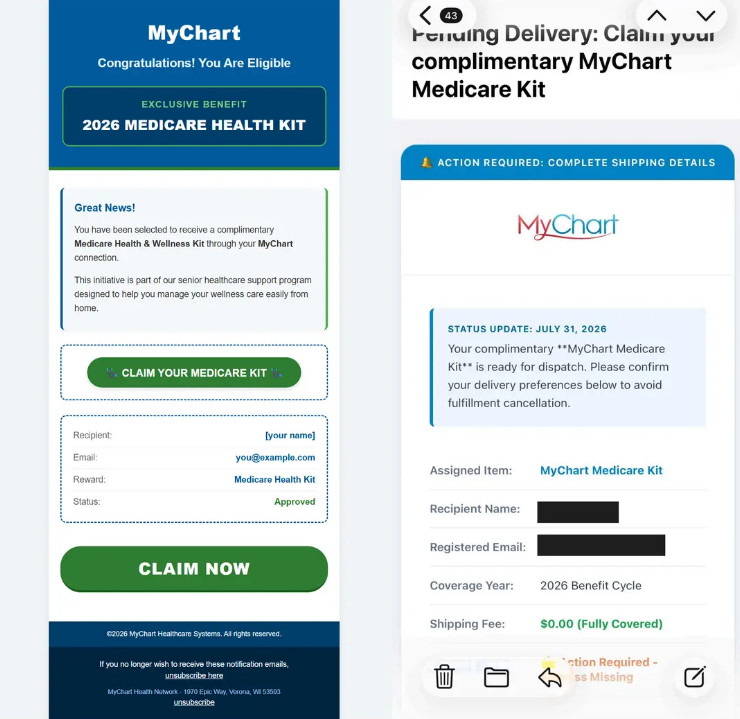
Patients have reported receiving fraudulent emails from email accounts posing as MyChart. If you receive an unexpected email from MyChart, or a message similar to the examples shown below:
- Do NOT click any links, including the “unsubscribe” link
- Do NOT provide any personal or financial information
- Do NOT reply to the email
- DO delete the email immediately
How to Stay Safe from Scam Emails
Look out for the common signs of scam messages, including:
- Misspelled words
- A suspicious sender or email address
- An email from Unity’s MyChart portal will be labeled “Your Unity Health Team” from the email address: YourCareTeam@UnityHealthCare.org
- Urgent or threatening language
- Unexpected links in the email
- Requests for passwords or sensitive data
- Unexpected attachments
The safest way to access your health record is directly through the secure MyChart App downloaded on a trusted device. Click here for more tips on how to protect yourself from MyChart scams and fraud.